How to Create and Write a Professional Resume for a Job Application: Step-By-Step Guide To Creating a Resume
Your resume is the single most important document in your job search: it's your first impression, your personal marketing tool, and often the deciding factor between landing an interview or getting passed over. In today's competitive job market, where recruiters spend just seven seconds scanning each resume, crafting a document that immediately showcases your value is essential. This comprehensive guide walks you through everything you need to know about creating a professional resume that stands out, from understanding what a resume is and its core purpose to mastering the step-by-step process of building one from scratch.
You will discover the key components every effective resume must include: contact information, professional summary, work experience with quantifiable achievements, education background, relevant skills, and optional sections that add depth to your profile. The guide explains how to choose the right resume format for your career stage, whether chronological (best for consistent work history), functional (ideal for career changers or those with employment gaps), or combination (perfect for mid-career professionals with diverse skills). You'll learn through practical job resume examples spanning entry-level candidates to creative professionals, each demonstrating how to structure and present your qualifications for maximum impact.
Beyond the basics, this guide reveals common mistakes that cost applicants interviews, from spelling errors and generic content to poor formatting and missing keywords for applicant tracking systems. You will gain actionable tips to customize your resume for each application, optimize it for both human recruiters and automated screening software, and avoid the pitfalls that make hiring managers reject otherwise qualified candidates. By following these proven strategies, you'll transform your resume from a simple list of qualifications into a powerful tool that opens doors to the career opportunities you deserve.
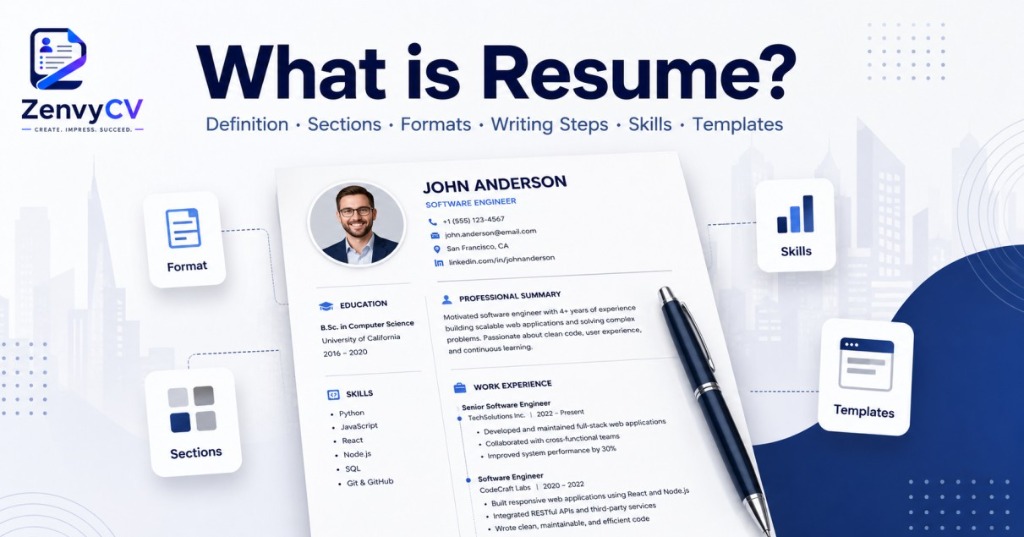
What is Resume?
A resume is a concise professional document that summarizes your work experience, education, skills, and key accomplishments. Typically one or two pages long, it presents your qualifications in a structured format that helps employers quickly assess your suitability for a job. It acts as a personal marketing summary, positioning you as a capable and relevant candidate within seconds of review.
🎯 The Purpose of a Resume
A resume functions as your personal branding tool in the job market. Its main goal is to convince employers that you are the right fit for a specific position and worthy of an interview. Since hiring managers scan resumes in seconds, yours must instantly highlight relevant experience, measurable achievements, and industry-specific skills. A polished resume communicates professionalism, attention to detail, and effective written communication before you ever meet the employer. It also guides interview discussions, as recruiters often refer to your listed experiences and results when forming their questions.
Key Components of a Resume
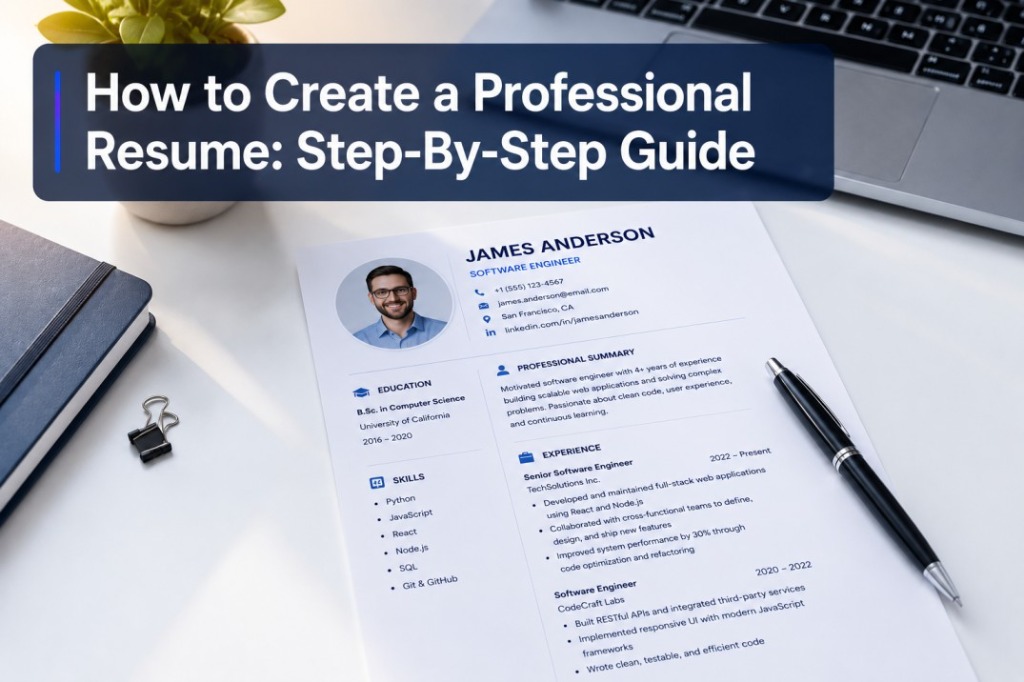
An effective resume includes several essential sections that collectively present your qualifications in a clear, organized manner.
Contact Information
Place your full name, phone number, professional email, LinkedIn profile, and city or region at the top. This ensures employers can easily identify and contact you for interviews.
Professional Summary
Write a concise 2–3 sentence overview emphasizing your most valuable skills, achievements, and career focus. Replace outdated objective statements with a summary that shows what you bring to the employer rather than what you seek.
Work Experience
List your employment history in reverse chronological order, starting with your most recent position. Include your job title, company name, employment dates, and 3–5 bullet points highlighting responsibilities and quantifiable achievements such as revenue growth, project completion rates, or team leadership.
Education
Detail your degrees, institutions, graduation dates, and relevant coursework or academic honors. Mention certifications or continuing education if they strengthen your credibility for the role.
Skills
Feature a mix of technical and soft skills tailored to the job description. Use keywords aligned with the employer's requirements to improve visibility in applicant tracking systems (ATS) and demonstrate immediate relevance.
Additional Sections (Optional)
Include certifications, volunteer work, professional memberships, publications, awards, or language proficiencies that enhance your profile. These sections add depth, showing initiative and expertise beyond standard job experience.
A resume is more than a job application document—it's your professional introduction. When structured effectively, it tells your career story clearly, highlights measurable value, and compels employers to take the next step: inviting you for an interview.
How To Create a Resume Step By Step?
Building a resume that gets you noticed doesn't have to feel overwhelming. Recruiters spend just seven seconds scanning a resume, so every section needs to count. Follow these steps to craft a professional document that showcases your best qualities.
Gather Your Career Information
Before you start writing, collect all the details you will need. Create a checklist that includes your work experience with job titles, company names, locations, dates, and key responsibilities. Don't forget your achievements—specific results that demonstrate your abilities matter most. Also gather information about your skills (both hard and soft), education details including degree, school name, graduation year and honors, certifications and awards with issuing organizations and dates, plus any volunteer work and extracurricular activities.
Select Your Resume Format
The format you choose should highlight your strongest qualities, and there are three main types to consider. The chronological format places your work history first and works best if you have solid professional experience with no employment gaps. A functional format emphasizes skills over work experience, making it ideal for recent graduates or career changers. The combination format shows skills and work experience equally, which suits mid-level professionals.
Build Your Resume Header
Your header needs to be straightforward and include your full name, job title, phone number, professional email, and city, state, and ZIP code. If you have a LinkedIn profile or professional portfolio, add those too. Make sure your email address sounds professional—if your current one doesn't include your name, create a new one specifically for job hunting.
Write a Strong Summary or Objective
This section sits at the top of your resume and needs to grab attention immediately. A resume summary should be three to four sentences highlighting your best skills and accomplishments. For those with limited professional experience, such as recent graduates, a resume objective quickly explains career goals and works better than a summary.
When writing your summary, use this formula: state your job title and years of experience, highlight two to three key skills or achievements, and mention what you can bring to the company. Include keywords from the job description to help your application stand out.
Detail Your Work Experience
Begin with your most recent job and work backward, listing at least two years of work experience to improve your chances of being contacted by employers. For each position, include the job title, company name, location, and employment dates.
Write your job duties in bullet points, and if applicable, include work achievements using numbers and percentages to show your impact. Keep descriptions concise and relevant, removing filler words like "and" and "the." Use action verbs like "managed," "developed," "increased," "achieved," or "drove" to demonstrate initiative.
For example, if a job description mentions meeting sales quotas, you could include information like "Achieved goal of reaching 250% annual sales quota." Focus on two to three key impacts you made in each role rather than listing every single task.
Include Your Education Background
List your most recent degree first and work backward, including the school's name, location, and graduation date. If you have limited work experience, add more details like completed credits if you haven't graduated yet, relevant coursework that shows industry knowledge, awards or honors, extracurricular activities, and academic projects or memberships.
Highlight Relevant Skills
Carefully read the job posting and identify keywords you can include, then list six to eight soft and hard skills that show you're a well-rounded candidate. Experts recommend entering at least three to five top skills to help your resume get noticed by employers. Choose abilities that directly relate to the position you're applying for. If you're changing careers, include transferable skills that showcase your adaptability.
Add Optional Sections That Strengthen Your Application
Standard resumes cover work experience, education, and skills, but adding extra sections can make yours stand out. Consider including:
- Certifications to prove your expertise
- Awards that show you're a top performer
- Professional memberships that demonstrate industry involvement
- Language skills for global workplaces
- Publications that share your thought leadership
- Volunteer work that shows you care about your community
Don't waste space on references—hiring managers will request them later if needed.
Format and Polish Your Resume
Use professional fonts like Calibri, Verdana, or Arial in 10-12 point size for text and 14 points for headings. Use 1-inch margins and single or 1.5 spacing, keeping your resume to one page if possible. Only use two pages if you have extensive work experience.
Before submitting, review formatting to ensure everything is clear and structured, check for completeness to make sure all essential sections are included, and scan for errors. Get a second opinion from a friend or mentor who can review your resume with fresh eyes.
Customize for Each Job Application
Tailor your resume for every job by mirroring keywords from the job posting and emphasizing experience that directly relates to the role. This helps you pass applicant tracking systems and appeals to hiring managers. Save your final version as a PDF to preserve formatting, and name your file clearly, like "Marketing-Manager-Resume-YourName.pdf."
Your resume is more than a list of qualifications—it's your personal marketing tool. Take time with each step to create a document that opens doors to the opportunities you deserve.
What Are The Job Resume Examples?
Job resume examples serve as practical templates that help you understand how to structure and write your own resume for a specific career field. Below are full-length examples demonstrating the right format, tone, and layout.
1. Chronological Resume Example
A chronological resume focuses on your work history presented in reverse order. It highlights consistent career growth and is ideal for professionals with a stable work background.
Sarah Jenkins
Chicago, IL | (555) 987-6543 | [email protected] | linkedin.com/in/sarahjenkins
Professional Summary
Results-driven Marketing Director with 8+ years of experience leading high-performing teams to execute multi-channel campaigns. Proven track record of increasing ROI by 45% and growing social media engagement by 300%.
Experience
Marketing Director, GlobalTech Solutions (2020 - Present)
• Managed a $2.5M annual marketing budget, delivering campaigns that generated $10M+ in new pipeline.
• Led a team of 12 digital marketers, designers, and content creators.
Senior Marketing Manager, TechCorp (2016 - 2020)
• Increased organic website traffic by 150% over two years through targeted SEO strategies.
• Launched 3 new product lines, achieving 120% of first-quarter sales goals.
Education
MBA in Marketing, Northwestern University (2016)
B.S. in Business Administration, University of Illinois (2014)
Skills: SEO/SEM, Content Strategy, Google Analytics, Salesforce, Team Leadership, Budget Management
2. Functional Resume Example
A functional resume emphasizes skills and abilities instead of work chronology. This type benefits candidates with career gaps, career changers, or freelancers.
David Chen
Austin, TX | (555) 123-4567 | [email protected] | github.com/davidchen
Professional Summary
Adaptable Software Developer transitioning from IT Support. Self-taught programmer with extensive hands-on experience building full-stack web applications and a strong foundation in problem-solving and system diagnostics.
Technical Skills & Projects
Web Development: React, Node.js, Express, HTML/CSS
• Built "TaskMaster," a full-stack project management app serving 500+ active monthly users.
Database Management: MongoDB, PostgreSQL
• Designed relational database schemas improving data retrieval speeds by 40% for personal portfolio projects.
Problem Solving & Diagnostics:
• Resolved 2,000+ IT helpdesk tickets with a 99% satisfaction rate in previous role.
Work History
IT Support Specialist, TechCare Inc. (2019 - 2023)
Freelance Web Developer (2023 - Present)
Education
Full-Stack Web Development Bootcamp, General Assembly (2023)
B.A. in History, University of Texas (2018)
3. Combination (Hybrid) Resume Example
A combination resume merges elements of chronological and functional formats. It presents a strong skills section followed by a concise work history.
Elena Rodriguez
Miami, FL | (555) 234-5678 | [email protected] | linkedin.com/in/elenarodriguez
Professional Summary
Certified Project Manager (PMP) with 10 years of experience bridging the gap between technical teams and business stakeholders. Expert in Agile methodologies, risk management, and delivering complex software implementations on time and under budget.
Core Competencies
• Agile & Scrum: Certified Scrum Master; successfully transitioned 3 traditional teams to Agile.
• Budget Management: Managed project portfolios exceeding $5M annually without overages.
• Stakeholder Communication: Led quarterly steering committee meetings with C-level executives.
Work Experience
Senior Project Manager, FinTech Solutions (2018 - Present)
• Directed a cross-functional team of 20 to launch a new mobile banking app 3 weeks ahead of schedule.
Project Coordinator, BuildRight Software (2013 - 2018)
• Streamlined reporting processes, saving project managers 10 hours per week.
Education & Certifications
Project Management Professional (PMP), PMI (2019)
B.S. in Information Systems, Florida State University (2013)
4. Entry-Level Resume Example
An entry-level resume helps students or recent graduates highlight education, internships, and transferable skills.
Marcus Johnson
Boston, MA | (555) 345-6789 | [email protected]
Professional Summary
Highly motivated recent Finance graduate with a 3.8 GPA and hands-on internship experience in financial modeling and data analysis. Eager to bring strong analytical skills and academic excellence to a Junior Financial Analyst role.
Education
B.S. in Finance, Boston University (May 2024)
• GPA: 3.8/4.0 | Dean's List: All Semesters
• Relevant Coursework: Corporate Finance, Econometrics, Financial Modeling, Accounting
Experience & Internships
Financial Analyst Intern, Apex Investments (Summer 2023)
• Assisted senior analysts in building discounted cash flow (DCF) models for 5 mid-cap companies.
• Compiled daily market summary reports presented to the portfolio management team.
Vice President, University Finance Club (2022 - 2024)
• Organized networking events connecting 100+ students with industry professionals.
Skills: Financial Modeling, Advanced Excel (VLOOKUP, Pivot Tables, Macros), Data Visualization (Tableau), Bloomberg Terminal, Strong Analytical Thinking
5. Creative Resume Example
A creative resume uses design elements to reflect personality and creativity, suiting graphic designers or artists.
Zoe Alistair
UI/UX Designer
[email protected] | Seattle, WA
About Me
Passionate UI/UX designer who believes in creating digital experiences that are as beautiful as they are functional. 4 years of agency experience designing award-winning mobile apps.
Experience
Lead UX Designer, PixelPerfect Agency (2021 - Present)
• Redesigned an e-commerce app interface, leading to a 35% increase in conversion rates.
• Conducted user research with 50+ participants to inform design decisions.
Education
BFA in Graphic Design, Rhode Island School of Design
Toolkit
- Figma / FigJam
- Adobe Creative Suite
- Webflow
- User Testing
- Wireframing
- Prototyping
6. Targeted Resume Example
A targeted resume tailors every section to match a specific job posting, aligning keywords, skills, and experiences with the employer's requirements.
James Thorne
Denver, CO | (555) 456-7890 | Target Role: Enterprise Account Executive
Objective Alignment
Senior B2B Sales Professional with a proven history of closing $1M+ enterprise SaaS deals. Bringing 7 years of full-cycle sales experience directly matching the requirements for the Enterprise Account Executive role at CloudCorp.
Relevant Experience (B2B SaaS Sales)
Senior Sales Executive, DataStream Inc. (2019 - Present)
• Consistently exceeded $2M annual quota by an average of 115% for 4 consecutive years.
• Closed the largest deal in company history ($1.4M ARR) with a Fortune 500 client after a 6-month sales cycle.
Account Executive, SalesTech Solutions (2016 - 2019)
• Prospected and acquired 40+ net-new enterprise accounts using advanced MEDDIC sales methodology.
Targeted Skills: Enterprise B2B Sales, CRM (Salesforce), Pipeline Management, C-Level Presentations, Contract Negotiation, SaaS Architecture Understanding
How To Choose the Right Resume Format?
Choosing the right resume format determines how effectively you communicate your qualifications to employers. The format you choose should highlight your strengths while minimizing any weaknesses in your work history.
Three primary resume formats dominate the job market. Each serves a different purpose and works best for specific career situations. Understanding these formats helps you make an informed decision that showcases your background in the best possible light.
1. Chronological Format
Lists work experience in reverse order. Most popular and widely accepted. Best for consistent work history and showing clear career progression. Easy for recruiters and ATS to scan.
2. Functional Format
Emphasizes skills and abilities rather than timeline. Ideal for career changers or significant employment gaps. Highlights transferable skills but can be suspicious to some recruiters.
3. Combination Format
Blends skills summary with chronological work history. Great for mid-career professionals with diverse skills who want to highlight expertise without losing the timeline structure.
Key Factors To Consider When Choosing Your Format
Your Career Stage
Recent graduates benefit from chronological formats. Mid-career professionals often succeed with combination formats. Senior executives usually prefer chronological formats that demonstrate leadership progression.
Employment History
Consistent work history points toward chronological. Sporadic employment or career breaks suggest functional. Diverse experience across different roles benefits from combination format.
Target Industry
Conservative fields (finance, law, healthcare) expect chronological formats. Creative industries accept flexible approaches. Tech companies focus heavily on skills regardless of format.
Employment Gaps
Gaps longer than six months are noticeable in chronological formats. Functional formats minimize gap visibility by emphasizing skills. Combination formats allow addressing gaps while showing history.
ATS Best Practices
- Keep formatting simple regardless of which type you choose
- Use standard section headings like "Work Experience" and "Education"
- Avoid tables, text boxes, and complex graphics that confuse scanning software
- Save your resume as a PDF to preserve formatting unless the job posting specifies otherwise
What Are The Common Resume Mistakes to Avoid?
A single mistake on your resume can cost you an interview. Employers and applicant tracking systems (ATS) quickly filter out resumes with avoidable errors. Knowing these common mistakes helps you create a clean, professional document that earns attention for the right reasons.
-
⚠️
1. Spelling and Grammar Errors
Spelling mistakes signal carelessness. Grammar errors reflect a lack of professionalism. Even a small typo can make recruiters doubt your attention to detail.
- Proofread carefully — read every word slowly instead of skimming.
- Don't rely solely on spell check; it misses correctly spelled words used incorrectly.
- Ask someone to review your resume — a fresh set of eyes often catches what you miss.
-
⚠️
2. Generic, One-Size-Fits-All Resumes
Generic resumes fail to show genuine interest. Employers want proof that you understand their specific needs.
- Customize your resume for each job.
- Mirror job keywords (e.g., use “client relationship management” if that's in the job ad).
- Show company insight by referencing their values or mission.
-
⚠️
3. Vague Job Descriptions Without Results
Tasks without measurable results create weak impact. Employers care more about what you achieved than what you were responsible for.
- Replace “responsible for” with action verbs like developed, managed, improved.
- Use quantifiable metrics (e.g., “Increased sales by 30% within six months”).
- Apply the CAR method (Challenge–Action–Result) to describe achievements clearly.
-
⚠️
4. Missing or Incorrect Contact Information
Incorrect contact details block hiring opportunities.
- Include an active phone number and check voicemail regularly.
- Use a professional email (e.g., [email protected]).
- Double-check every number and letter for accuracy.
-
⚠️
5. Unprofessional Email Addresses
Your email creates a first impression before your resume does.
- Create a separate, professional email for job applications.
- Avoid silly or outdated usernames (e.g., cooldude2024).
- Skip birth years or inside jokes that reduce credibility.
-
⚠️
6. Including Irrelevant Personal Information
Personal information distracts from professional qualifications.
- Don't include photos unless it's standard in your country or industry.
- Omit marital status, age, religion, or political affiliation.
- Include hobbies only when relevant.
-
⚠️
7. Poor Formatting and Design Choices
Unclear formatting confuses recruiters and ATS systems.
- Use simple fonts (Calibri, Arial, Times New Roman, 10–12pt).
- Maintain white space for readability.
- Avoid tables, graphics, or text boxes that may break ATS parsing.
-
⚠️
8. Resume Length Problems
Length signals experience and judgment.
- 1 page: for early-career professionals.
- 2 pages: for experienced candidates or executives.
- Cut irrelevant details before expanding your resume.
-
⚠️
9. Using Outdated Resume Elements
Old sections make your resume look dated.
- Remove “References available upon request.”
- Replace Objective Statements with a modern Professional Summary.
- Exclude high school details after college.
-
⚠️
10. Lying or Exaggerating Qualifications
Dishonesty damages your reputation permanently.
- Never fake degrees, certifications, or job titles.
- Don't extend employment dates to hide gaps.
- Be transparent about your real skill level—employers verify everything.
-
⚠️
11. Employment Gaps Without Context
Unexplained gaps create doubts about reliability.
- Address gaps briefly and honestly.
- Use years instead of months to minimize short gaps.
- Include volunteer work, freelancing, or learning experiences.
-
⚠️
12. Too Much Focus on Duties Instead of Achievements
Listing duties tell what you did, not how well you did it.
- Turn responsibilities into measurable achievements.
- Include metrics like percentages, revenue growth, or efficiency improvements.
-
⚠️
13. Including Salary Information
Salary details limit your negotiation power.
- Never list salary history or expectations.
- Discuss pay only during later interview stages.
- Focus on value delivered instead of compensation desired.
-
⚠️
14. Weak or Missing LinkedIn Profile
A strong LinkedIn presence strengthens your credibility.
- Keep your LinkedIn profile consistent with your resume.
- Add your LinkedIn URL to your contact info.
- Update your photo, skills, and recommendations.
-
⚠️
15. Using Personal Pronouns
Personal pronouns break professional tone.
- Avoid “I,” “me,” or “my.”
- Write “Led marketing team” instead of “I led my marketing team.”
- Start bullet points with action verbs for clarity.
-
⚠️
16. Ignoring Keywords for ATS
Missing keywords cause automatic rejection.
- Study job descriptions and extract key terms.
- Use both full forms and abbreviations.
- Integrate keywords naturally into bullet points and skills sections.
-
⚠️
17. Submitting the Wrong File Format
Wrong file types prevent your resume from opening properly.
- Save as PDF to preserve formatting (unless otherwise stated).
- Use .docx if specifically requested for ATS.
- Name your file clearly: John_Smith_Resume.pdf.
-
⚠️
18. Not Tailoring to Company Culture
Ignoring company culture reduces perceived fit.
- Research the company's values, tone, and environment.
- Align your language and examples with their expectations.
- Highlight shared values such as teamwork, innovation, or community involvement.
Final Takeaway
Your resume represents your professional identity. Avoiding these mistakes increases your chances of being shortlisted.
Focus on:
- Precision – avoid errors and clutter.
- Relevance – tailor to the job and company.
- Authenticity – present your real value.
Every detail should serve one purpose: to prove your value to the employer.